Audit and Inspection
An integrated platform for conducting inspections and audits and tracking observations to ensure compliance with standards.
The Inspection and Audit System within the Green Codes platform provides a fully integrated digital solution for managing and executing all field inspections and audit activities with high efficiency. It starts from preparing inspection checklists and customized forms based on the type of activity or project, followed by conducting field inspections, documenting observations and findings, and ending with generating reports and following up corrective actions until final closure.
The system allows organizations to perform inspections and audits easily through the web platform or mobile application, with the ability to attach photos, voice notes, and accurately determine locations. This helps improve the quality of review processes, accelerate the detection of gaps, and enhance compliance across work sites.
The system also supports generating instant reports and interactive dashboards that help analyze inspection results, monitor compliance rates, and identify locations or departments that require priority action. This enables decision-makers to take proactive actions to strengthen compliance, improve operational performance, and raise safety and quality standards.
This is achieved within a framework that supports compliance with approved regulations and standards while promoting a culture of continuous improvement and effective control across organizations and projects.
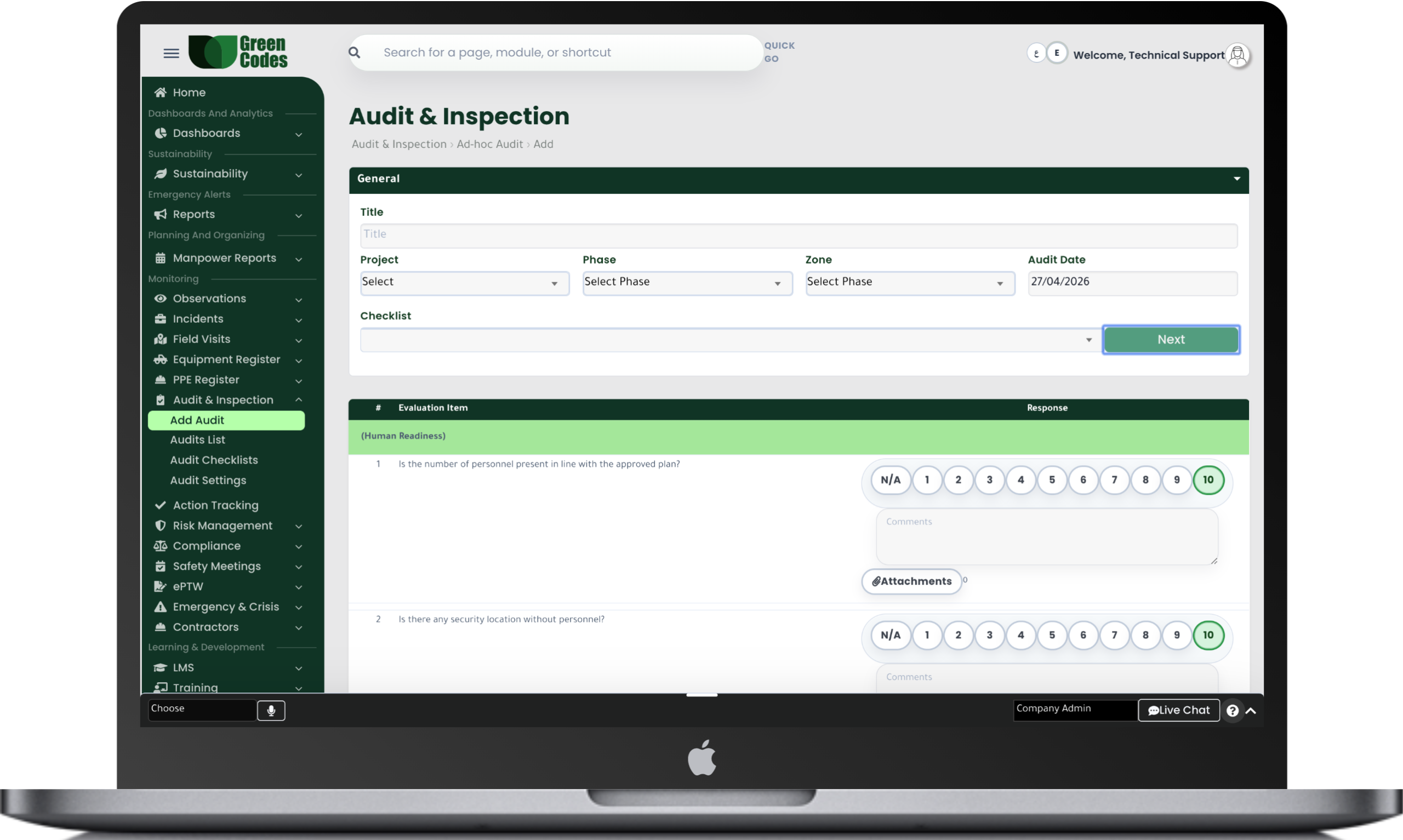
The Inspection and Audit System within the Green Codes platform provides a fully integrated digital solution for managing and executing all field inspection and audit activities with high efficiency. It starts from preparing inspection checklists and customized forms based on the type of activity or project, followed by conducting field rounds, documenting observations and findings, and ending with issuing reports and following up corrective actions until final closure.
The system allows organizations to perform inspections and audits easily through the web platform or mobile application, with the ability to attach photos, voice notes, and accurately determine locations. This helps improve the quality of review processes, accelerate the detection of gaps, and enhance compliance across work sites.
The system also supports creating dynamic and customizable inspection forms according to organizational requirements or approved standards, helping standardize inspection procedures and improve the level of operational monitoring.
The system provides a comprehensive set of reports and interactive dashboards that help analyze inspection and audit results, such as non-conformance reports, compliance rates, field inspection results, and priority locations.
It also provides executive reports that help management monitor trends and analyze the causes of repeated observations, enabling decision-makers to take proactive actions to improve performance and raise safety and quality standards.
The system follows a clear workflow that starts with creating the inspection or audit form and defining the scope, followed by conducting the field inspection and recording findings and observations.
After that, reports are issued, corrective actions are created, responsible persons are assigned, and implementation is followed up until final closure.
The system also supports automatic reminders for scheduled inspections and periodic audits.
Create Form → Conduct Inspection → Record Findings → Issue Report → Corrective Actions → Closure
- Dynamic inspection checklists
- Periodic and scheduled audits
- Photos and voice notes attachments
- Non-conformance reports
- Compliance rates tracking
- Corrective actions management
- KPI reports and dashboards
- Web and mobile application support
Frequently Asked Questions (FAQ)
What is the difference between field inspection and auditing (Audit) within the system?
Field Inspection focuses on quick verifications of site conditions and safety controls at a specific moment in time. An Audit, however, is a systematic process that compares actual practices against the requirements of a standard, policy, or regulation, resulting in nonconformities and improvement opportunities. Having both in one platform unifies evidence and links it directly to closure procedures.
Can custom checklists be created for each project or activity?
Yes. You can create dynamic templates that include Yes/No questions, scoring scales, and “Not Applicable” options, with the ability to require photo attachments for nonconformities. You can also build conditional logic to reveal additional questions based on specific answers. This ensures the checklist is tailored to actual site risks rather than being a generic, ineffective form.
How are periodic inspections scheduled and assigned to inspectors?
You can establish weekly or monthly Inspection Plans based on site, contractor, or activity type, then assign them to specific inspectors. The inspector receives a task notification, and the results are recorded with execution timestamps. Management can monitor plan compliance rates to identify sites that are lagging in their scheduled rounds.
How are Nonconformities (NCs) resulting from audits handled?
When a nonconformity is logged, the system defines the classification, probable root cause, required action, responsible party, and closure deadline. Nonconformities can be linked to specific standard clauses or internal policies to facilitate later proof of compliance. Corrective and Preventive Actions (CAPA) are then tracked until closure and effectiveness verification.
Can evidence such as photos, measurement logs, and documents be attached?
Yes. Evidence can be authenticated as part of the Audit Trail, such as photos of violations, equipment inspection reports, or training records. This significantly reduces the time spent searching for evidence during external audits or official regulatory visits. It also increases report credibility and simplifies sharing results with consultants and owners.
How does the system help manage the annual audit program and standard compliance?
You can build an audit program covering multiple systems (Safety, Environment, Quality) while defining the scope, frequency, and audit teams. The system displays indicators such as the number of audits completed, closure rates, and recurring areas of concern. This transforms auditing into a continuous improvement process as recommended by international auditing guidelines.
Can inspection and audit reports be exported in a formal, shareable format?
The system generates professional PDF reports including summaries, findings, photos, and an action item list with assignees and deadlines. Data can also be exported to Excel for advanced analysis. Standardizing the report format eliminates inconsistencies between sites and enhances professional standing with clients and official authorities.