Safety Meetings
An integrated platform for organizing safety meetings, documenting decisions and recommendations, and efficiently tracking their implementation.
The Meeting Management System within the Green Codes platform provides a complete digital solution for organizing and documenting safety and quality meetings with high efficiency, starting from scheduling meetings and defining attendees, through recording meeting minutes and decisions, all the way to tracking the implementation of recommendations and resulting actions. The system enables organizations to manage meetings easily through the web or mobile application, with the ability to attach files and notes, helping improve coordination between different teams.
It also supports instant reports and interactive dashboards that help monitor open recommendations and completion rates, enabling decision-makers to strengthen communication and ensure decisions are implemented on time. This comes as part of supporting an organized work environment and improving coordination efficiency within organizations.
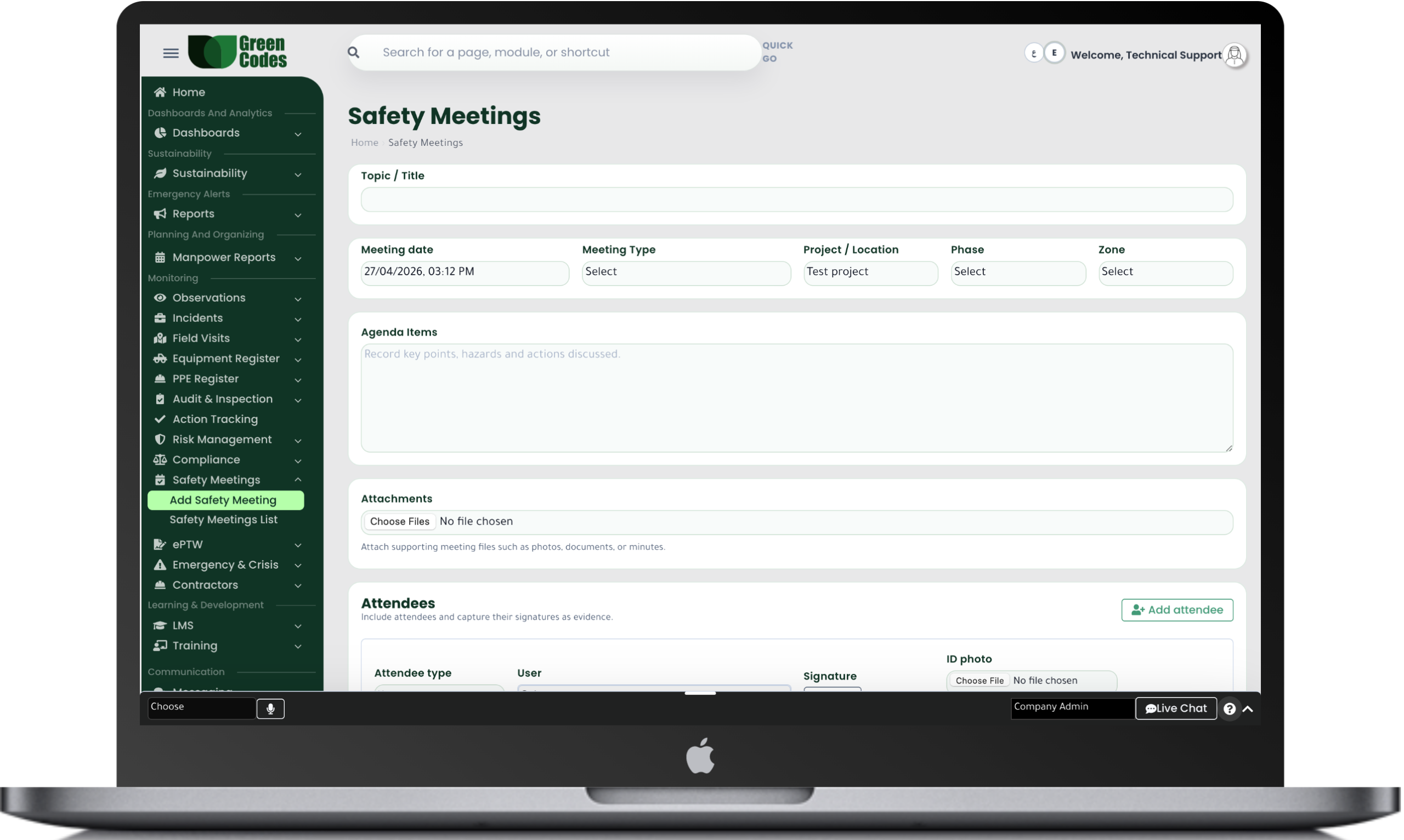
The Meeting Management System within the Green Codes platform provides a complete digital solution for organizing and documenting all safety, management, and quality meetings efficiently. The system allows users to easily create meetings, define the date, time, and location, add participants, and send invitations and notifications automatically, helping improve coordination between different work teams.
The system also supports documenting meeting minutes, recording key discussion points, decisions, and recommendations, and linking each recommendation to specific action tasks and responsible persons, ensuring easier follow-up and improving the efficiency of decision implementation within the organization.
The system provides a complete set of reports and interactive dashboards that help track all meetings and their minutes, such as reports for completed meetings, attendance and absence rates, and the number of open and closed recommendations.
It also provides detailed reports on team performance in implementing decisions resulting from meetings, helping management measure the level of commitment and improve internal communication and decision-making effectiveness.
The system follows a clear workflow that starts with creating the meeting and defining participants, then sending invitations and attendance notifications. After the meeting is held, the meeting minutes are recorded, decisions and recommendations are added, and then distributed to the assigned responsible persons for follow-up until closure.
The system also sends automatic notifications for open or delayed recommendations to ensure fast completion.
Create Meeting ← Send Invitations ← Hold Meeting ← Record Minutes ← Distribute Recommendations ← Follow-up and Closure
- Easy meeting scheduling
- Automatic invitations and notifications
- Meeting minutes recording
- Attendance and absence tracking
- Linking recommendations to action tasks
- PDF attachments and meeting records
- Decision follow-up reports
- Complete history of previous meetings
Frequently Asked Questions (FAQ)
What types of meetings does the management system support?
The system supports safety committee meetings, monthly project performance reviews, risk management meetings, and Management Reviews. You can customize templates for each meeting type based on specific requirements, such as mandatory attendance logs or fixed agenda items, ensuring consistent documentation across all sites.
How are meetings created, and how are invitations and reminders sent?
You can set the date, time, location, or meeting link, then add participants based on their roles (e.g., HSE, contractors, consultants). The system sends automated invitations and reminders before the scheduled time to reduce absences. Agendas can also be attached in advance so teams can prepare for the required topics.
Can meeting minutes be documented and linked to attachments?
Yes. Points of discussion, decisions, and recommendations can be recorded in a unified format, with the ability to upload presentations, photos, or related reports. This makes it easy to refer back to previous meetings if an issue recurs or the project team changes. You can also generate an official PDF minutes document to share with all parties.
How are meeting decisions converted into trackable tasks?
Tasks can be created directly from meeting recommendations by assigning a responsible person, due date, and priority level, all linked to the original minutes. A tracking dashboard shows what has been completed and what is overdue, preventing decisions from remaining “on paper” only. The status of each recommendation can be followed in subsequent meetings until closure.
Does the system support attendance tracking and signatures?
The system allows for recording attendance and absences, and adding digital signatures or attendance confirmations according to company policy. This provides evidence of participation and consultation, which is vital for safety meetings when audited by clients or regulatory bodies. You can also extract attendance percentage reports by department or contractor.
How does the system support participation and consultation per safety requirements?
Documenting meetings and safety committees provides a formal channel for employees to participate in health and safety decisions and submit their feedback. Storing agreements, participant lists, and approvals increases transparency and trust. This aligns with modern safety management standards that emphasize worker participation as a core element.
Can Management Review meetings required by certain standards be managed?
Yes. A template for Management Reviews can be prepared that includes KPIs, audit results, major incidents, goal achievement, and improvement plans. Management decisions, such as resource reallocation or policy changes, are then documented. This complies with local guidelines regarding the importance of recording the results and decisions of official review meetings.
How can past meetings be searched, archived, and retrieved quickly?
Users can search by title, date, project, or keywords within the minutes, with filters for meeting types. Meetings can also be categorized by committees or projects to simplify archiving. This reduces “knowledge loss” when employees leave or contractor contracts end.