Safety Observations
An integrated platform for recording, tracking, and analyzing safety observations to enhance safe behavior across work sites.
The Safety Observations System within the Green Codes platform provides a complete digital solution that enables organizations to record and manage all safety observations, positive observations, and unsafe practices with high efficiency.
It starts with capturing field observations and documenting them instantly, followed by classifying them based on type, location, and risk level, and ending with tracking corrective actions and closing observations after verifying the resolution.
The system allows users to register observations easily through the web platform or mobile application, with the ability to attach photos, voice notes, and accurate location details. This helps accelerate reporting, improve data quality, and enhance immediate response across work sites.
It also supports instant reporting and interactive dashboards that help analyze trends, identify the most frequent observation areas, monitor closure rates, and measure team engagement levels. This enables decision-makers to take proactive actions to reduce risks and continuously improve the work environment.
This comes within the framework of supporting compliance with approved regulations and standards, strengthening a proactive safety culture, and increasing awareness and participation across institutions and projects.
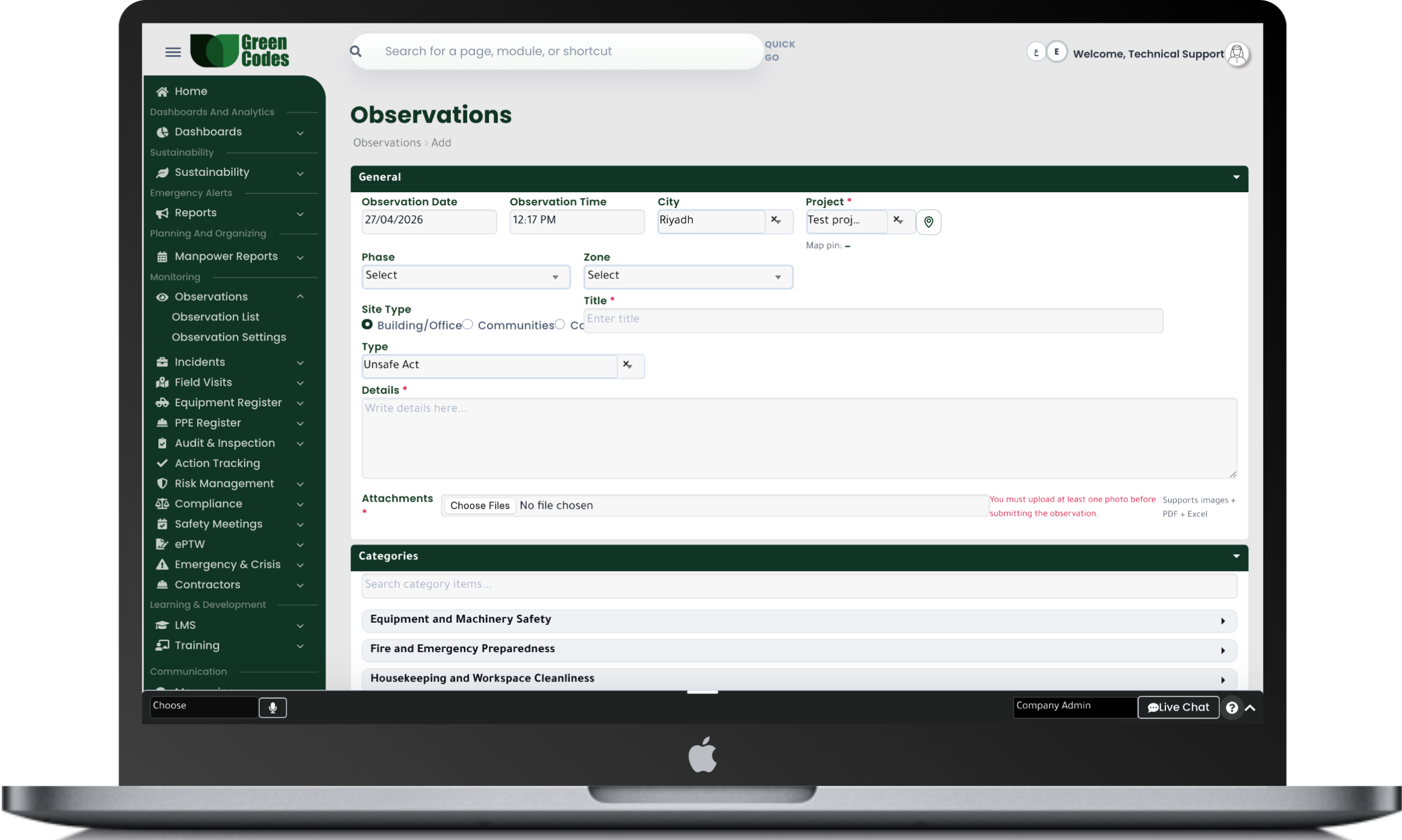
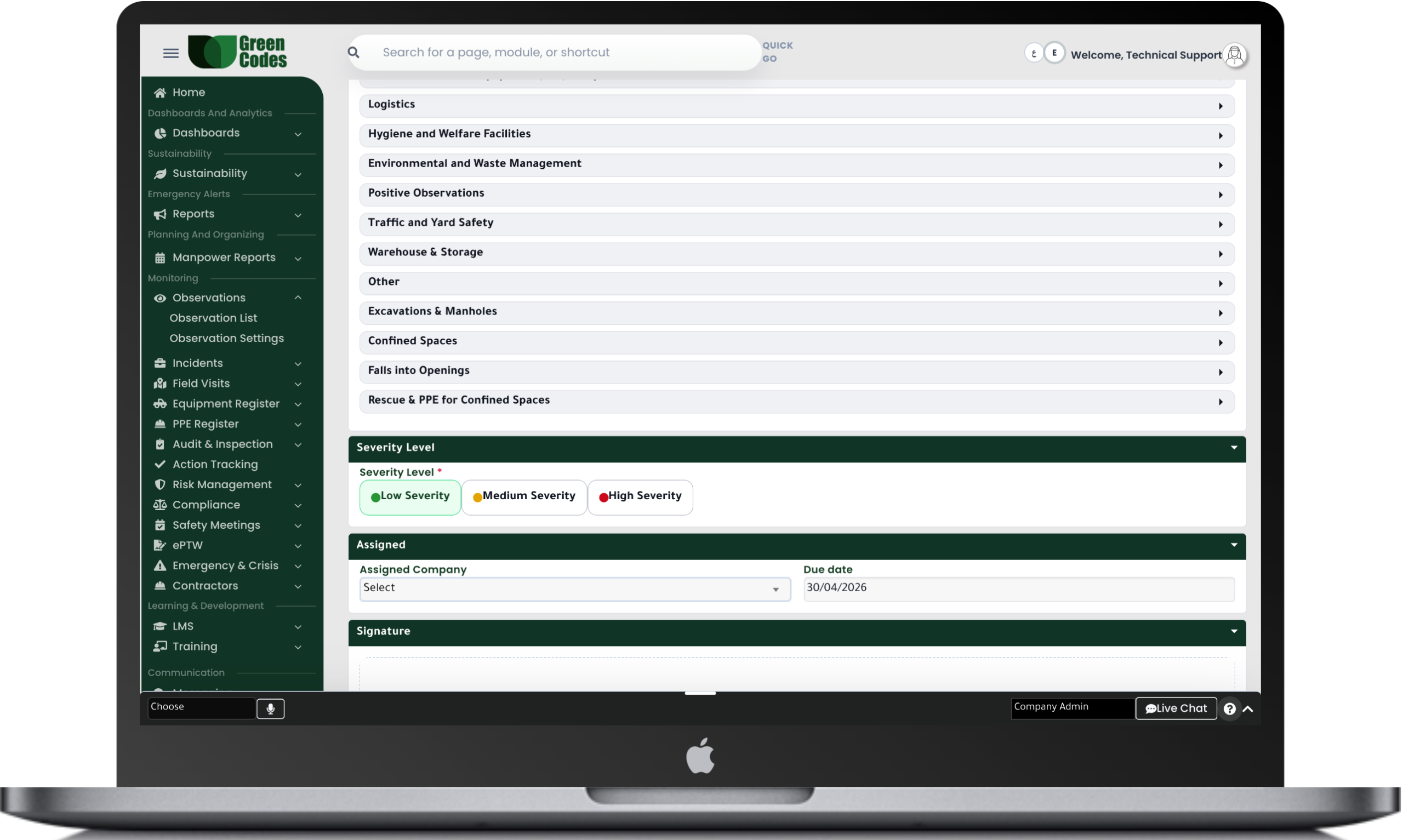
The Safety Observations System within the Green Codes platform provides a complete digital solution that enables organizations to record and track all safety observations, unsafe practices, and positive observations with high efficiency. It starts with capturing field observations and documenting them instantly, followed by classifying them based on type, location, and risk level, and ending with tracking corrective actions and closing observations after verifying the resolution.
The system allows users to register observations easily through the web platform or mobile application, with the ability to attach photos, voice notes, and accurate location details. This helps accelerate reporting, improve data quality, and enhance immediate response across work sites.
The system also supports strengthening a proactive safety culture by encouraging work teams to report daily observations and turning them into actions that reduce the possibility of future incidents.
The system provides a complete set of reports and interactive dashboards that help analyze all safety observations, such as observation count reports, observations by type or location, closure rate reports, and the most frequently repeated observation areas.
It also provides executive reports that help management analyze trends and monitor engagement levels from work teams, enabling decision-makers to improve the work environment and reduce risks proactively.
The system follows a clear workflow that starts with recording the observation by the user or safety team, then sending it for review and evaluation based on the risk level. After that, a corrective action is created, the responsible person is assigned, and execution follow-up continues until final closure.
The system also supports instant notifications to the concerned departments in case of high-risk observations or observations that require urgent intervention.
Observation ← Review & Assessment ← Corrective Action ← Execution ← Follow-up ← Closure
- Observation registration through web and mobile application
- Photo attachments and voice notes
- Accurate location identification
- Risk-based classification
- Corrective actions tracking
- KPI dashboards and reports
- Instant notifications
- Strengthening proactive safety culture
Frequently Asked Questions (FAQ)
How does the system help increase the number of observations without creating a "blame culture"?
The system allows for the implementation of “non-punitive” reporting policies, encouraging workers to share hazards without fear—an approach supported by Near Miss policies that focus on learning and improvement. Depending on organizational policy, you can enable anonymous reporting or restrict the reporter’s identity to the safety team only. When lessons learned are shared back with the workforce, employees see the value of reporting, which significantly boosts participation.
What are the standard fields that can be configured in the observation form?
The form can be customized to include: Location, Activity, Hazard Type, Potential Severity, Observation Description, Immediate Action taken, and Recommendations. Client-specific fields—such as area number, contractor name, or violation category—can also be added. Making key fields mandatory ensures high data quality and improves the accuracy of subsequent analytics.
Can photos be attached and the geographical location of the observation be specified?
Yes. Visual evidence drastically reduces the time needed to understand a situation and minimizes disputes over facts, especially on large-scale sites. You can attach before/after photos or documents like site maps and active permits. Furthermore, observations can be pinned to specific work zones to guide inspectors directly to high-risk spots.
How are observations categorized and prioritized for resolution?
Observations can be categorized by discipline (e.g., PPE, Scaffolding, Electrical, Equipment Movement) and by Potential Severity. High-risk observations can be set to escalate immediately to specific teams with shorter deadlines and instant notifications. Low-risk items, meanwhile, are integrated into long-term improvement plans without disrupting daily operations.
How are observations converted into trackable corrective actions?
Upon approving an observation, the system can generate a linked Corrective Action with an assigned owner and due date. This link remains in the record, preventing recommendations from getting lost in informal communication channels. After closure, a field verification can be requested to ensure the root cause was addressed, rather than just hiding the symptom.
Does the system support "Positive Safety Observations" and incentive programs?
Yes. You can create a category for Positive Observations, such as correct PPE usage, excellent site housekeeping, or proper energy isolation. This helps recognize outstanding teams and builds a balanced safety culture that doesn’t just focus on mistakes. Reports on positive observations can be exported to support reward and incentive programs.
What indicators measure the effectiveness of a safety observation program?
Key metrics include: Number of observations per man-hours, closure rates within deadlines, and hazard distribution by category. You can also measure Observation Quality by the percentage of reports that resulted in effective corrective actions or a reduction in recurring issues. This aligns with the concept of “Leading Indicators” as a tool to enhance safety program effectiveness.