Permit to Work
An integrated platform for issuing and managing work permits electronically to ensure work is carried out according to the highest safety standards.
The Electronic Permit to Work System within the Green Codes platform provides a complete digital solution for issuing and managing all types of work permits with high efficiency. It starts from creating and approving the permit, followed by reviewing safety requirements and approvals, and ends with final closure after the work is completed.
The system allows organizations to issue permits easily through the web platform or mobile application, with real-time status tracking and automatic notifications, helping ensure that work is performed safely and in full compliance with safety procedures.
The system also supports instant reporting and interactive dashboards to monitor open and closed permits, enabling decision-makers to improve compliance levels and reduce operational risks.
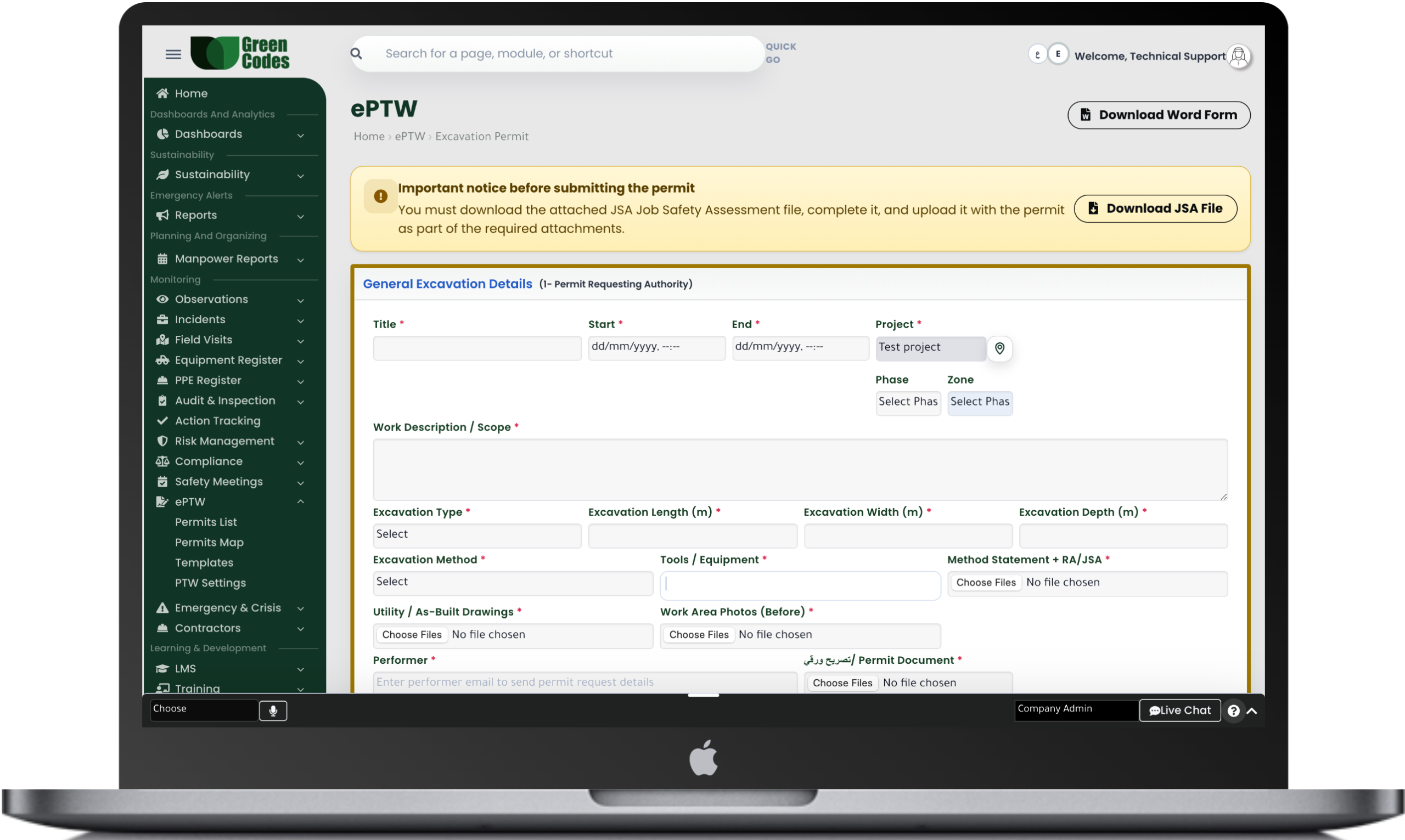
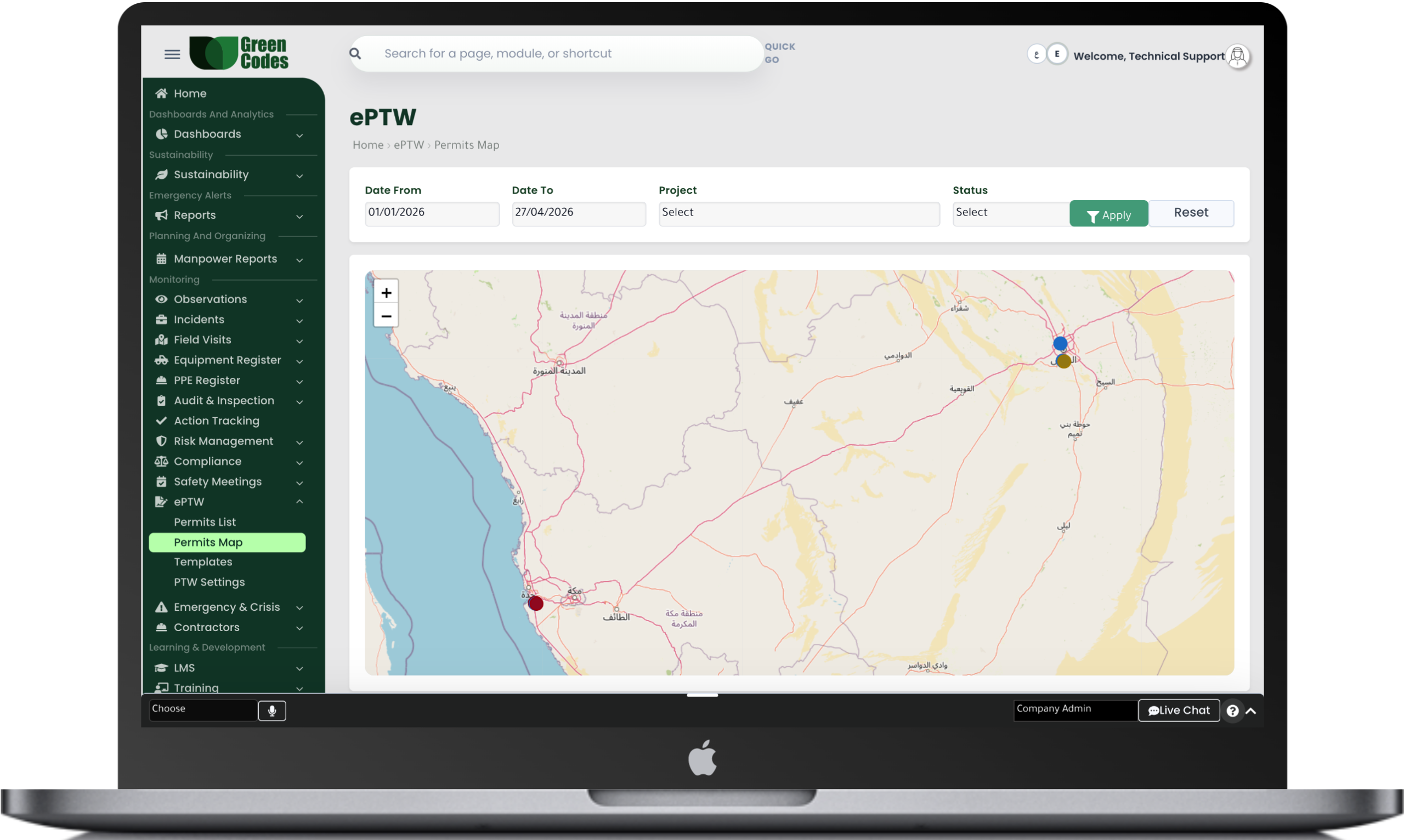
The Electronic Permit to Work System within the Green Codes platform provides a complete digital solution for issuing and managing all types of work permits efficiently, such as hot work permits, cold work permits, confined space permits, excavation permits, lifting permits, electrical work permits, and working at height permits.
The system allows permits to be created easily through the web platform or mobile application, with the ability to define the work location, permit type, validity period, and associated risks, helping ensure that work is carried out according to the highest safety standards.
The system also supports a full electronic approval cycle involving all relevant parties such as contractors, consultants, safety managers, and supervisors, with the ability to add digital signatures, attachments, and photos, ensuring faster approvals, improved compliance, and reduced operational risks.
The system provides a comprehensive set of reports and interactive dashboards that help monitor all open, closed, suspended, and expired permits, in addition to reports for permits nearing expiration.
It also offers detailed reports based on permit type, project, contractor company, or time period, helping management monitor compliance levels and analyze risk trends related to field operations.
The system follows a clear workflow that begins with permit creation by the executing party, then the permit is sent to the responsible الجهات for review and approval.
After approval, on-site verification can be performed using a QR Code to confirm the permit status, after which the permit becomes active and work execution can begin.
Once the work is completed, closure procedures are carried out by documenting the site condition, attaching photos or required notes, and then the permit is officially closed within the system.
Create Permit → Review → Approval → Execution → Field Verification → Closure
- Multiple permit types
- Multi-level electronic approval workflow
- QR Code for field verification
- Digital signatures
- Expiry notifications
- Field attachments and photos
- Real-time status tracking
- Reports by project and contractor
Frequently Asked Questions (FAQ)
What is an Electronic Permit to Work (e-PTW) and what is its operational value?
A Permit to Work is a formal written system used to control specific high-risk activities by defining what will be done, where, when, and what precautions are required. Transitioning to an electronic permit reduces paperwork errors, accelerates approval speeds, and improves tracking and auditing. It also facilitates the standardization of forms across projects and enhances the organization’s audit readiness.
What types of activities are covered by the Permit to Work system?
The system can be configured for multiple permit types, such as Hot Work, Confined Spaces, Electrical Work and Isolation (LOTO), Excavation, Lifting, and Work at Height. For each permit type, a custom list of mandatory risks and controls can be defined to match the activity. This prevents the issuance of generic permits that fail to focus on the actual task risks.
Who are the standard parties involved in the permit approval cycle?
Typically, there is the Applicant (Performer), the Permit Issuer (Area Supervisor), the Safety Officer, and sometimes a Consultant or Owner Representative. It is best practice to separate the authority to perform the work from the authority to approve it to avoid conflicts of interest. The system can also define delegates for approvals during vacations to ensure continuous operations without safety gaps.
How is the permit linked to Risk Assessment and JSA before starting work?
A Job Safety Analysis (JSA) can be attached within the permit, identifying key hazards, controls, and required PPE. This ensures a unified understanding of risks between the work team and supervisors, reducing misunderstandings. Formal communication—a core element of PTW standards—is strengthened between management, supervisors, and performers.
Does the system support isolation controls (LOTO) and Simultaneous Operations (SIMOPS)?
Verification steps for isolation and specific checkpoints can be added for before, during, and after the work—practices essential for managing high-risk tasks. The system can also trigger SIMOPS reviews when multiple permits are active in the same area or when activities conflict. This reduces operational interference and limits accidents resulting from inadequate isolation.
How is permit validity verified on-site?
Permits can be viewed on mobile devices or printed with a QR code for instant status verification. Upon scanning, the system displays the permit number, work type, validity period, authorized personnel, and mandatory controls. This minimizes reliance on outdated copies or expired permits.
Can a permit be extended or re-validated when conditions change?
Yes, a permit can be extended according to project policy, provided that controls are re-verified and risks are re-evaluated if necessary. The reason for extension (e.g., weather changes, team shifts, or equipment delays) is recorded to ensure the permit is not an “open-ended” approval. This reinforces the principle that a permit is tied to specific, verified conditions.
What are the standard procedures for closing a permit after work completion?
Closure occurs after confirming the site is clean, obstructions are removed, and isolation tools are retrieved or power is restored according to established steps. Post-closure photos or a final checklist can be added as evidence. Linking closure to a formal handover/acceptance report increases discipline and reduces latent risks.
How does the electronic permit help with auditing and compliance with codes or client policies?
The system maintains an Audit Trail showing who created, reviewed, approved, modified, and closed the permit, significantly increasing transparency. Internal or reference requirements (such as “Hot Work” elements or “Permit” requirements in Fire Codes) can be embedded into mandatory checklists. This makes it easy to prove compliance during audits or during an investigation into a permit-related incident.
What are the most important fields recommended for a Permit to Work form?
Useful fields include: Permit Type, Location/Area, Work Description, Start and End Date/Time, Workforce and Supervisors, Key Hazards, Controls, PPE, and Emergency Plans. Additional fields such as Work Order Number or Equipment ID can be added based on client requirements. Standardizing these fields ensures data quality and makes reporting more accurate and reliable.